Opening Hours


Microsoft has quietly given Windows 10 home users another year of free security updates. Here is what Brisbane households need to do to stay protected until October 2027.
By MCG Team | 7 minute read | Lead image: Vitaly Gariev / Unsplash
Key points
- Free security updates for Windows 10 home PCs now run until 12 October 2027, a year later than planned.
- Only PCs enrolled in Extended Security Updates are covered. You can check under Settings > Update & Security > Windows Update.
- Enrolling costs nothing if you sync your PC settings with Windows Backup.
- Eligible PCs can move to Windows 11 for free. Older PCs need an upgrade or a replacement before October 2027.
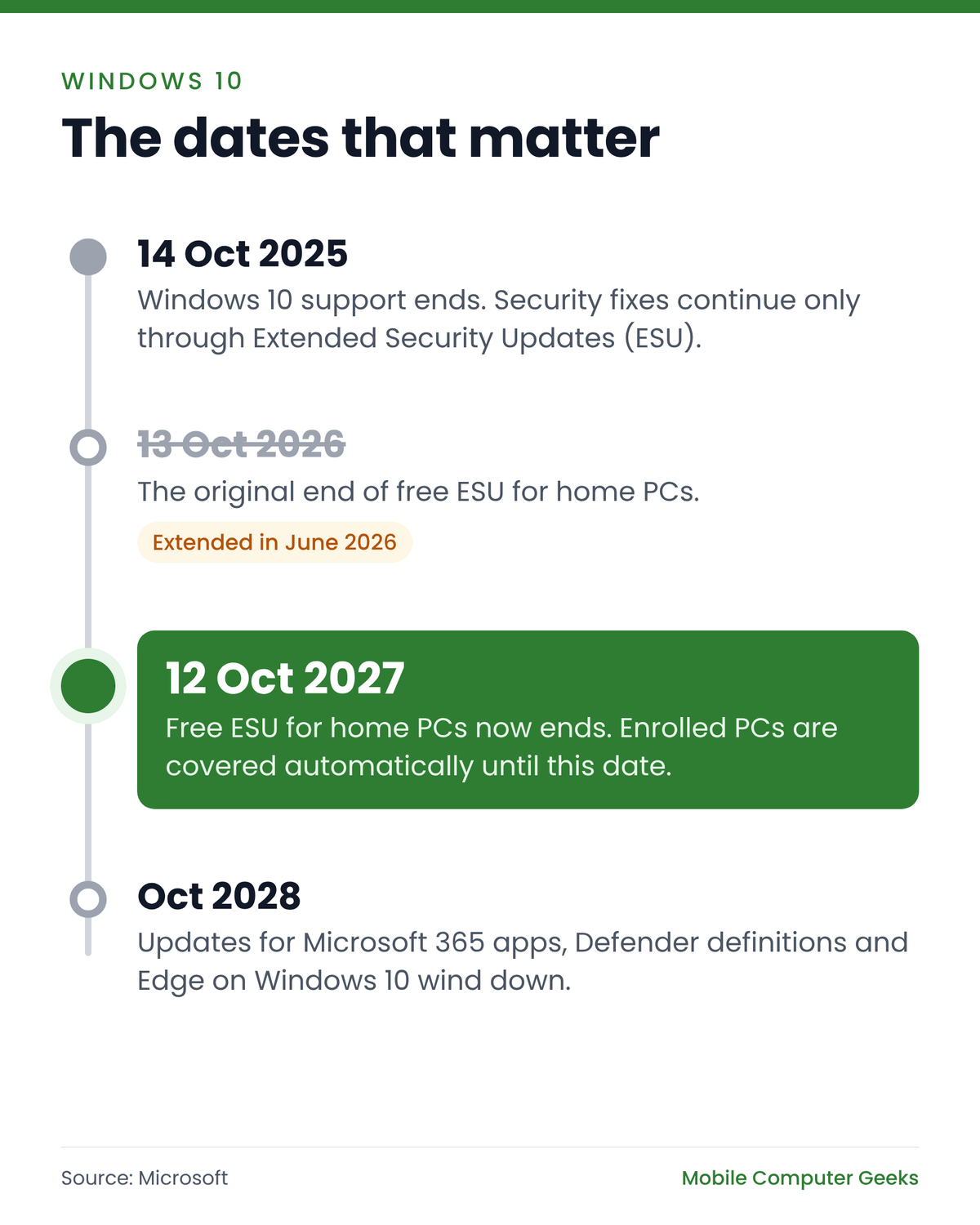
Home computers running Windows 10 were due to stop receiving free security updates on 13 October 2026. In June 2026, Microsoft pushed that date back a full year, to 12 October 2027.
The catch is that the extra year only reaches PCs enrolled in Microsoft’s Extended Security Updates (ESU) program. A PC that was never signed up has not received a Windows security fix since October 2025.
Plenty of households are affected. StatCounter figures for September 2026 show Windows 10 still accounted for 18.6% of Windows computer use in Australia, or almost one in five.
What has changed
Microsoft ended standard support for Windows 10 on 14 October 2025. Since then, the only way for a Windows 10 PC to keep receiving security fixes has been the ESU program, which Microsoft first offered home users as a one-year safety net.
The company made the change without a formal announcement. It updated its Extended Security Updates page and added an editor’s note to an earlier Windows blog post, as Help Net Security reported in June 2026. PCs that were already enrolled carry on automatically, so there is nothing to do if yours is covered.
ESU delivers critical and important security updates only. It adds no new features and does not include technical support from Microsoft.
How to check if your PC is covered
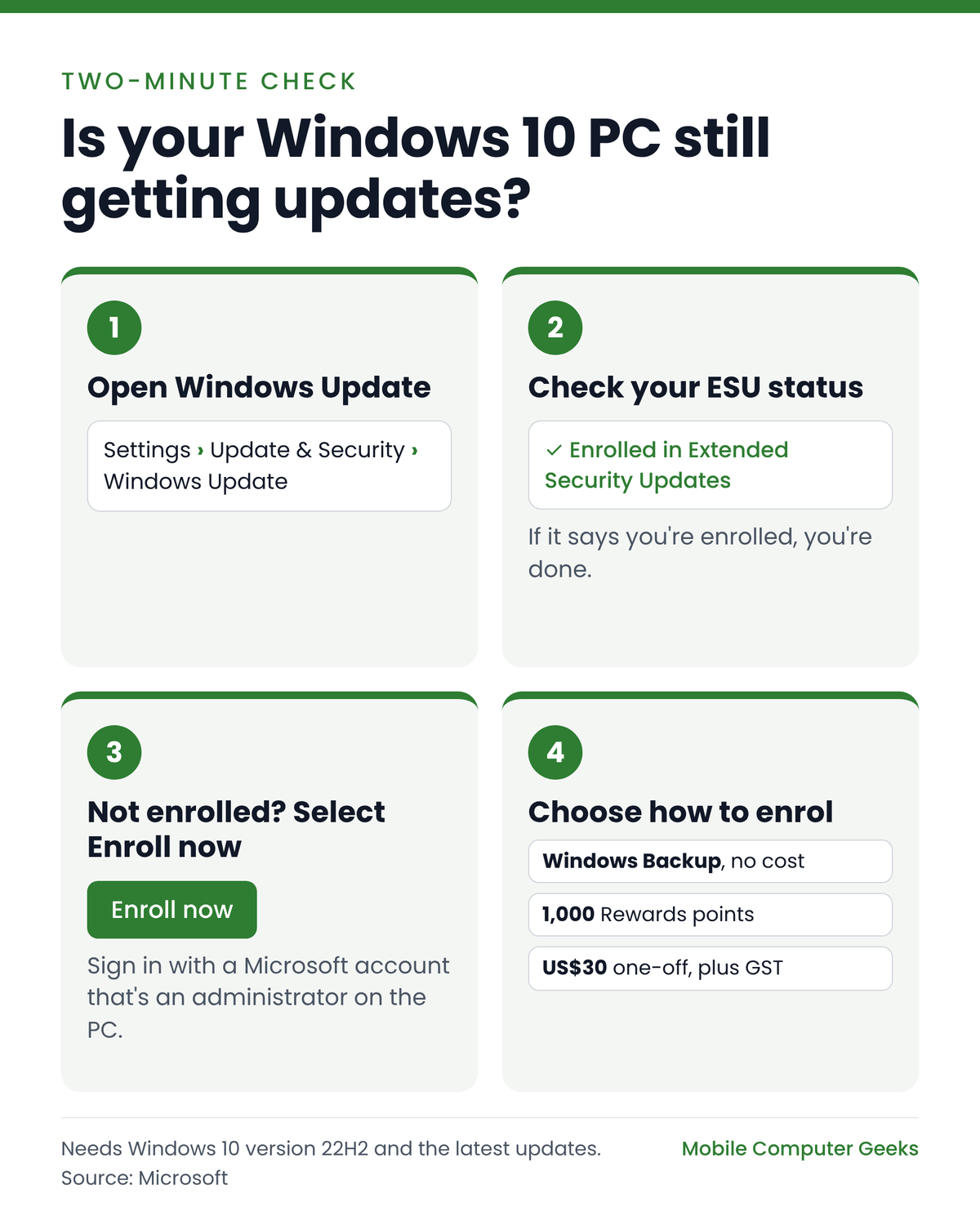
It takes about two minutes:
- Open Settings > Update & Security > Windows Update.
- Your ESU status is shown on this screen. If the PC is enrolled, it will say so.
- If you see an Enroll now link, select it. If you sign in to Windows with a local account, you will be asked to sign in with a Microsoft account.
- Choose how to enrol: back up your PC settings with Windows Backup (no cost), redeem 1,000 Microsoft Rewards points, or make a one-off purchase of US$30 (charged in the local currency equivalent, plus GST).
To be eligible, the PC needs Windows 10 version 22H2 (Home, Pro, Pro Education or Workstations) with the latest updates installed. The Microsoft account has to be an administrator on the PC, not a child account, and one licence covers up to 10 PCs.
What still gets updated on Windows 10
Some Microsoft software keeps receiving updates on Windows 10 for longer than Windows itself:
| Software on Windows 10 | Updates continue until | Notes |
|---|---|---|
| Windows 10 (the operating system) | 12 October 2027 | Only if the PC is enrolled in ESU |
| Microsoft 365 apps (Word, Excel, Outlook) | 10 October 2028 | Security updates only once version 2608 is reached |
| Microsoft Defender Antivirus | October 2028 | Virus definition updates |
| Microsoft Edge browser | At least October 2028 | ESU not required |
Those app updates help, but they do not patch weaknesses in Windows itself. A PC that is not enrolled in ESU is running an unsupported operating system, even if its antivirus is up to date. Microsoft has published the details for Microsoft 365 apps and Defender, and Windows Central has the Edge timeline.
Why an unsupported PC is a risk
“The risk of a cyber security incident significantly increases when unsupported products are used.”Australian Cyber Security Centre
That warning comes from the Australian Cyber Security Centre’s guide to end-of-support products. Scammers and malware target known weaknesses in old systems, and an unpatched PC is an easier way into your email, online banking and saved passwords. The centre’s advice is to know your end-of-support dates, plan ahead, and upgrade either the software or the device.
If you are unsure how exposed your PC and accounts are, our cybersecurity check works through the weak spots with you and explains them in everyday language.
Your options before October 2027
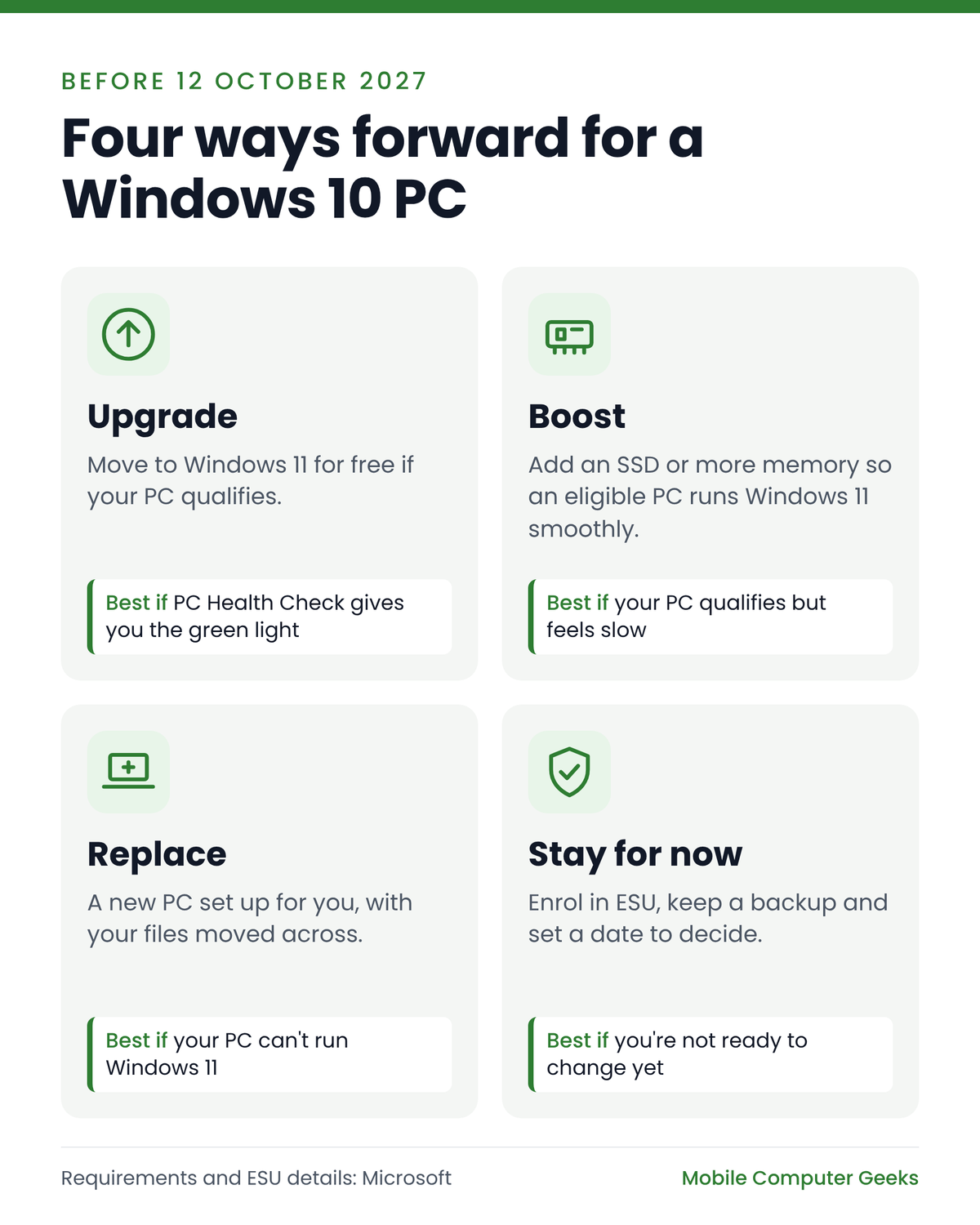
1. Upgrade to Windows 11

If your PC meets Microsoft’s Windows 11 requirements, the upgrade is free through Windows Update. The minimum specifications are:
- a compatible 64-bit processor (1 GHz or faster, with 2 or more cores)
- 4 GB of RAM and 64 GB of storage
- UEFI firmware with Secure Boot capability
- TPM (Trusted Platform Module) version 2.0
Microsoft’s free PC Health Check app will tell you whether your PC qualifies. Most PCs that fail do so because of the processor or the TPM chip. Back up your files before upgrading, or have us upgrade Windows for you with your files kept in place.
2. Give an eligible PC a boost
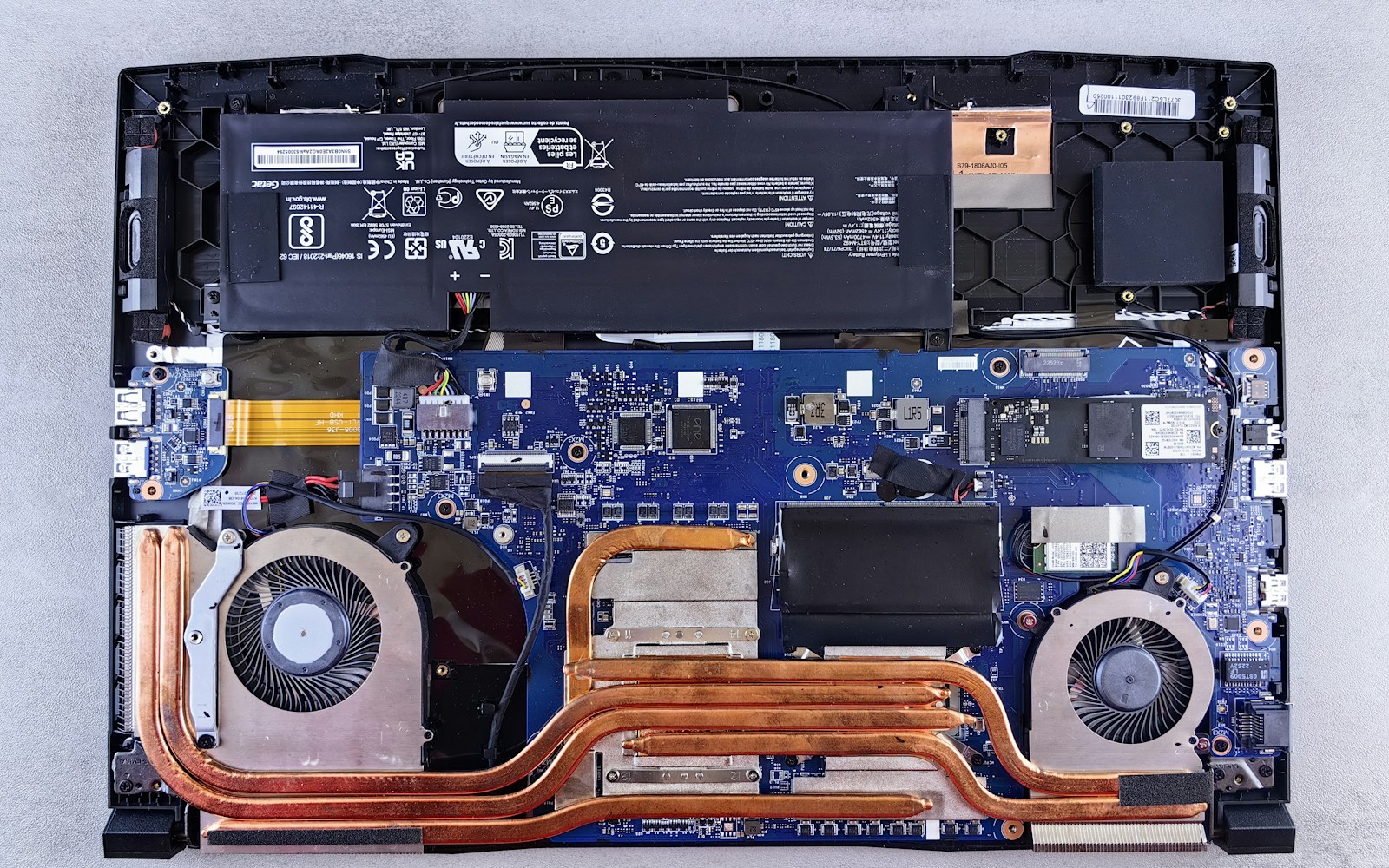
If your PC can run Windows 11 but feels slow, a solid-state drive (SSD) or extra memory usually costs far less than a new computer. See our SSD and memory upgrades.
3. Replace it and move everything across
If your PC cannot run Windows 11, plan the replacement before October 2027 rather than after. We can set up your new computer where you use it, back up and transfer your data, and recycle the old PC with its hard drive securely destroyed.
4. Stay on Windows 10 for now
If you are not ready to change, make sure the PC is enrolled in ESU, keep Windows Update and Microsoft Defender switched on, and keep a current backup. Then put a date in the diary to decide well before 12 October 2027.
What it means for small businesses
Microsoft’s consumer ESU program is designed for personal use. Organisations use a separate commercial ESU program, which can be bought for up to three years after October 2025. For most small offices, upgrading or replacing PCs is a better use of money than paying for extra years of Windows 10. Our managed IT services team can audit your devices and plan the change around your work.
A simple plan
- Check your Windows version and ESU status in Windows Update.
- Back up your photos, documents and email.
- Run PC Health Check to see whether Windows 11 is an option.
- Decide whether to upgrade, boost or replace, and do it well before 12 October 2027.
- Ask for help if any step is unclear.
How Mobile Computer Geeks can help
Our Geeks help homes and small businesses across Brisbane, Logan, Ipswich, Moreton Bay and Redland Bay, onsite or remotely. We can check your ESU status, test whether your PC can run Windows 11, upgrade it, or set up a replacement and move everything across, all explained in plain language. There is no surcharge for same-day, weekend or after-hours appointments (subject to availability).
Call 07 3063 7616 or book online. You can also see our price list.
Frequently asked questions
Does Windows 10 still get security updates?
Yes, for home PCs enrolled in Microsoft’s Extended Security Updates program. Coverage now runs until 12 October 2027. PCs that are not enrolled stopped receiving Windows security updates after 14 October 2025.
Is Windows 10 ESU free in Australia?
It can be. Enrolment costs nothing if you back up your PC settings with Windows Backup or redeem 1,000 Microsoft Rewards points. Otherwise it is a one-off purchase of US$30, charged in the local currency equivalent plus GST.
I enrolled before. Do I need to do anything?
No. Microsoft says PCs that are already enrolled keep receiving updates until 12 October 2027 automatically.
Will my computer stop working in October 2027?
No. A Windows 10 PC keeps working after ESU ends, but it stops receiving security fixes, so it becomes more exposed to malware and scams over time.
How do I know if my PC can run Windows 11?
Run Microsoft’s free PC Health Check app. Windows 11 needs a compatible 64-bit processor, 4 GB of RAM, 64 GB of storage, Secure Boot and TPM 2.0. If you are not sure, our Geeks can check it for you.
Sources
- Microsoft: Windows 10 Extended Security Updates
- Help Net Security: Microsoft gives Windows 10 users an extra year of free security updates (26 June 2026)
- Microsoft Learn: Microsoft 365 Apps on Windows 10
- Microsoft Tech Community: End of Windows 10 support: what Defender customers need to know
- Windows Central: Microsoft Edge will keep getting free updates on Windows 10 until 2028
- Microsoft: Windows 11 specifications and requirements
- Australian Cyber Security Centre: Quick Wins for your End of Support (PDF)
- StatCounter: Windows version market share, Australia (desktop)